Controllers, GameCube Adapters & Keyboard Setup
Configure 8-player SDL3 gamepads, 4-port GameCube USB adapters (WinUSB & HID), positional vs label buttons, SSF2 keyboard movement, and low-latency PC pads.
- Up to 8 players
- Native 4-port GameCube USB
- SSF2 keyboard mode
- SDL3 + XInput
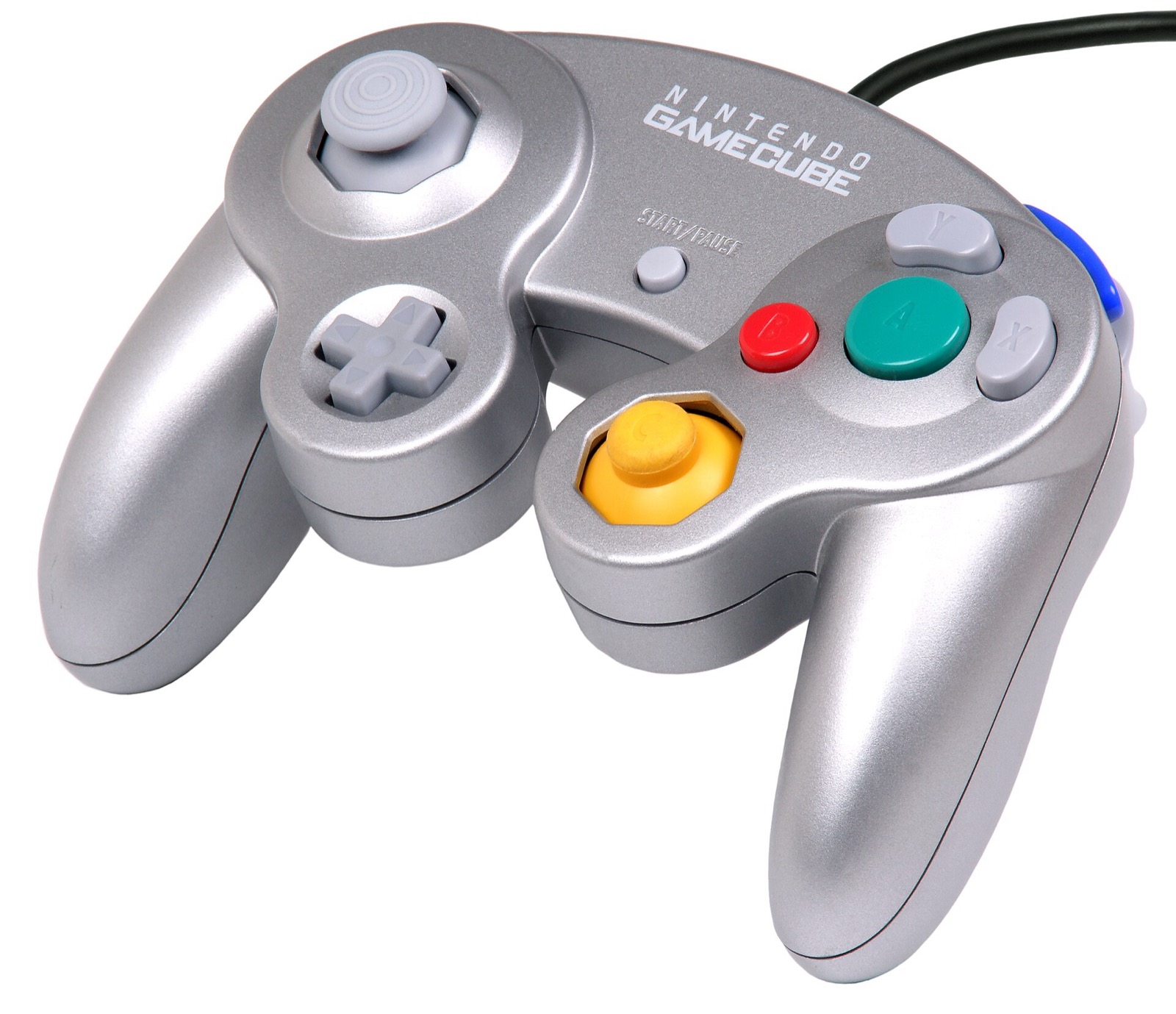
8-player SDL3, XInput & native GameCube controller support
OpenSmash-Ultimate supports up to 8 simultaneous players across GameCube controllers, Nintendo Switch Pro Controllers, Sony DualSense / DualShock 4, Xbox Wireless Controllers, 2.4 GHz Hall/TMR pads, fightsticks, and keyboard. Press F2 during play or open Esc → Controllers to inspect every detected device, player slot, and GUID.
- Automatic hot-plug slot memory: Each controller that connects claims the next open player slot; unplugging and reconnecting restores the exact same player number.
- Positional vs printed-label buttons: By default (
layout = positional), face buttons follow the physical Nintendo Switch diamond (right button = A, bottom button = B). If you prefer Xbox printed letters, switch Layout tolabelsin Esc → Controllers. - Ensure
SDL3.dllis present: WithoutSDL3.dllbesidebuild\ssbu.exe, Windows falls back to XInput only (Xbox pads in slots 1–4). BothOpenSmash-Setup.exeandInstall WindowSmash.batinstall SDL3 automatically.
GameCube controller & 4-port USB adapter setup
Competitive Smash players can use original GameCube controllers with native octagonal gate coordinates, true analog L/R shoulder travel, dedicated Z macro behavior, and in-game Options → Controls → GameCube Controller profiles:
- Nintendo Wii U / Switch USB Adapter or Mayflash 4-Port GameCube Controller USB Adapter: Slide the hardware switch on the adapter to Wii U (not PC) for native 4-port direct polling. Unlike emulators that force a driver swap, OpenSmash works with both Windows’ built-in HID driver and the WinUSB driver installed by Zadig for Dolphin. Plug in the second (grey) USB cable as well to enable controller rumble. (Third-party adapters switched to PC mode also work as standard SDL pads.)
- Nintendo Switch 2 USB GameCube Controller (USB cable only; Bluetooth unsupported): This pad requires an initialization handshake on USB Interface 1. If
build\play.logreports its interface 1 has no WinUSB driver, open Zadig, choose Options → List All Devices, select Interface 1 (USB ID057E 2073 01: do not replace Interface 0!), and install WinUSB. On restart,play.logconfirms Switch 2 GameCube controller started. - Apple silicon macOS GameCube adapters: Enable
GCAdapterDriverand installlibusb(brew install libusb) with the adapter set to Wii U mode. - Give any standard pad GameCube controls: Set
style = gamecubeunder[device xboxone]or[device ps5]inconfig\controllers.inito map triggers to L/R and bumpers to Z.
Smash PC controllers & adapters
OpenSmash-Ultimate and WindowSmash support up to 8 concurrent players via SDL3, XInput, and native Wii U / Switch GameCube USB adapter polling (both Windows HID and Zadig WinUSB drivers, with analog L/R triggers and rumble):
| Hardware | Best For in OpenSmash-Ultimate | Input Path & Latency Notes | Link |
|---|---|---|---|
| Mayflash 4-Port GameCube Controller USB Adapter | 4-port GameCube controller play | Switch to Wii U mode for native 4-port GameCube input + rumble (second grey USB plug) | View on Amazon |
| Nintendo Switch Pro Controller | Native positional ABXY layout | Matches Switch button positions out of the box via SDL3 (`[device switchpro]`) | View on Amazon |
| GameSir Cyclone 2 | Low-latency 1000 Hz wireless Smash | Zero-drift TMR sticks, microswitch face buttons, XInput & Switch SDL3 modes | View on Amazon |
| 8BitDo Ultimate 2 Wireless | Desktop & SteamOS handheld dock | TMR sticks, charging dock, 2.4 GHz dongle + Switch / XInput mode switch | View on Amazon |
| Sony DualSense | PlayStation pad (`[device ps5]`) | Full SDL3 support with configurable per-device rumble and deadzone in `controllers.ini` | View on Amazon |
| Xbox Wireless Controller | Zero-setup Windows 10/11 XInput | Works natively for players 1–4; set `layout = labels` or `style = gamecube` if desired | View on Amazon |
As an Amazon Associate, this site earns from qualifying purchases.
Default keyboard bindings, Shift walk & Super Smash Flash 2 mode
Keyboard defaults to Player 1 alongside Pad 1 (set keyboard_player = 0 in config\controllers.ini if you want Player 1 exclusively on a controller and Player 2 on another):
| Switch Input | Default Keyboard Key |
|---|---|
| Left stick (Move / Dash) | Arrow keys (hold Shift = WALK modifier for tilts & platform crouch) |
| A / B / X / Y | Z / X / C / V |
| L / R (Grab / Shield) | A / S |
| ZL / ZR | Q / W |
| + / − (Start / Select) | Enter / Backspace (Return / Delete on macOS) |
| Right stick (C-Stick) | I / J / K / L |
| Settings / Overlay / Details | Esc (Settings), F1 (FPS & ping), F2 (Connected pads), F3 (Screenshot), F11 (Fullscreen) |
Because digital keys push the virtual stick to 100% immediately, holding Shift (WALK) scales stick tilt partway so you can walk, perform forward/up/down tilts without smashing, and crouch on platforms without dropping through. Alternatively, added in PR #126 (v0.3.0-alpha.2), setting movement = ssf2 under [keyboard] enables Super Smash Flash 2 tap-to-walk, double-tap-to-dash, and tap-Up short-hop logic.
Advanced config/controllers.ini customization
Open config\controllers.ini from Esc → Controllers → Open controllers.ini to configure per-device sections ([device default], [device ps5], [device switchpro], [device gamecube], or specific GUIDs):
| Key | Effect | Default |
|---|---|---|
keyboard_player | 1–8 assigns keyboard to that player slot; 0 disables keyboard gameplay. | 1 |
layout | positional matches physical Switch button positions (Xbox B = Switch A); labels matches printed letters. | positional |
style | auto (GameCube adapters as GameCube, others as Pro Controller), gamecube, or pro. | auto |
deadzone | Center stick deadzone from 0 to 50 percent. | 0 |
rumble | Per-pad vibration strength 0–100% (or 0/1 master toggle under [general]). | 100 |
trigger_threshold | Analog travel needed to register digital ZL/ZR on standard pads (1–99%). GameCube L/R stay true analog. | 25 |
movement ([keyboard]) | full (instant full stick) or ssf2 (Super Smash Flash 2 tap-walk, double-tap dash, tap short-hop; PR #126). | full |
dpad_moves / stick_taunts | Lets fightsticks and hitbox-style controllers drive movement on D-pad and taunts on left stick. | off |
[general]
keyboard_player = 0
background = 1

[device default]
layout = positional

[device ps5]
rumble = 60

[keyboard]
movement = ssf2
LSTICK_LEFT = A
LSTICK_UP = W
LSTICK_RIGHT = D
LSTICK_DOWN = S
X = Space
L = Shift
R = Ctrl
ZR = E
Steam Input & Big Picture launch parameters
To launch a Windows build directly through Steam Input for exotic controllers, add "C:\OpenSmash\build\ssbu.exe" as a Non-Steam Game, set Start In to "C:\OpenSmash", and set Launch Options to dump\modules --status 30 --online (omit --online for offline play).
Common questions
Which mode switch should I use on the Mayflash 4-Port GameCube Adapter?
Set the physical switch on the adapter to Wii U / Switch mode. OpenSmash detects all 4 ports natively as authentic GameCube controllers with analog L/R triggers, whether your PC uses Windows’ default driver or Dolphin’s Zadig WinUSB driver.
Why did online rollback matches share Player 1’s controller in early alpha builds?
Issue #145 in v0.3.0-alpha.2 caused online rollback sessions to read from controller slot 1. Release v0.3.0-alpha.3 fixed #145 so each player uses their own assigned controller in Quickplay and Local Wireless rollback rooms.
How do I stop my keyboard from also controlling Player 1 when multiple pads are plugged in?
Open Esc → Controllers and change Keyboard Player to 0 (or set keyboard_player = 0 under [general] in config\controllers.ini).